01
Overview
Project name
Stanca
Your accountability companion
One-line description
A local-first mobile expense tracker that turns receipt photos into organised spending records and syncs them to your Google Drive and Sheets.
My role
Timeline
Category
Platforms
Tech stack
02
The Problem
Most expense apps either feel like corporate banking tools or push everything into the cloud. For freelancers and young professionals, especially people spending across currencies, tracking receipts is still manual, messy, and easy to abandon. People wanted something that could capture a receipt quickly, work offline and stay private on the device, export cleanly into Google Drive and Sheets, and handle multi-currency without forcing one home worldview on every transaction. The gap was accountability without friction: scan, verify, organise, and actually keep up with spending.
03
The Solution
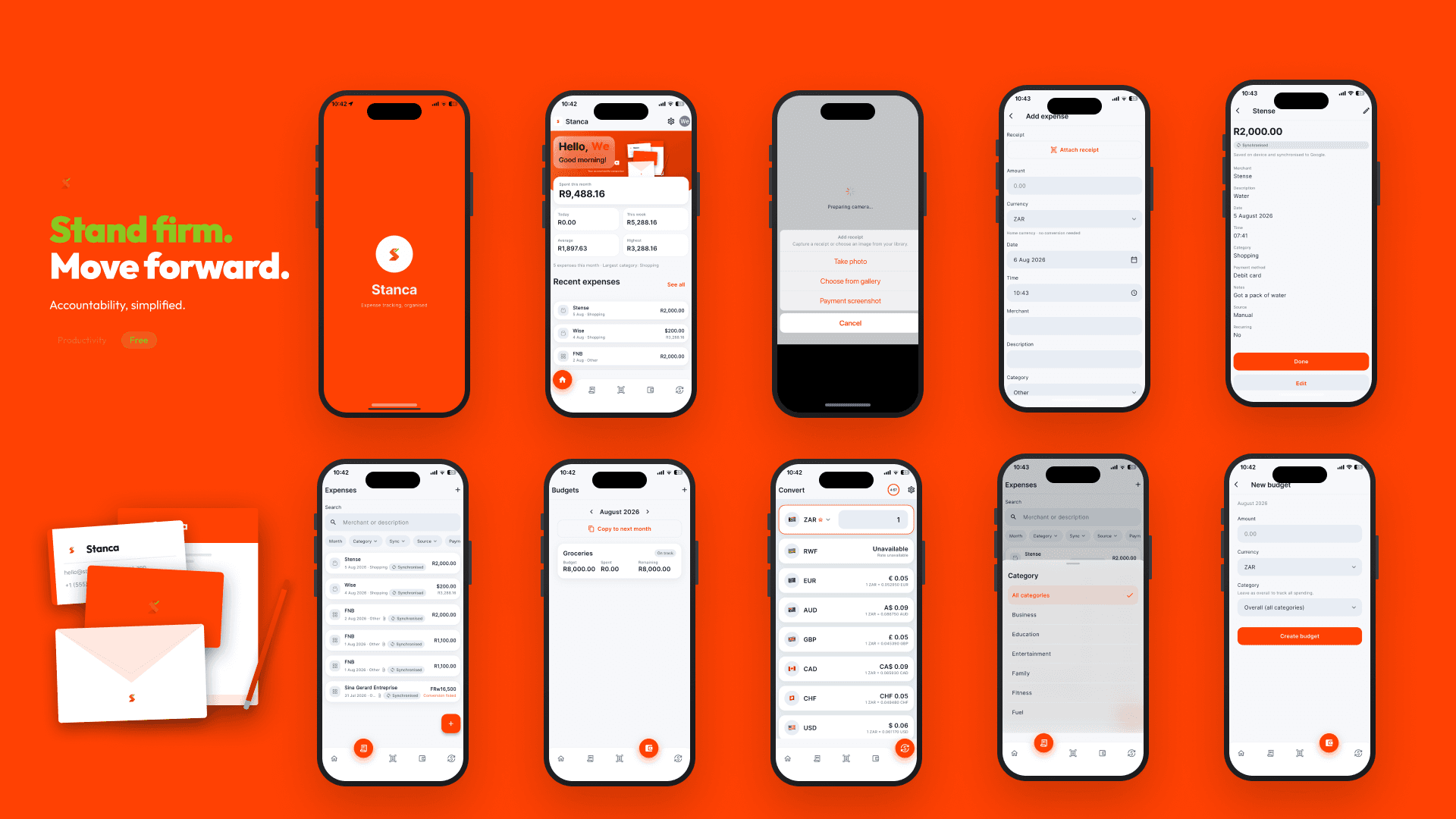
Stanca is a local-first expense companion. Users sign in with Google, capture or upload receipts, review OCR-extracted fields on-device, and save expenses to a SQLite database on their phone. Verified data syncs to their Google Drive (receipt images) and Google Sheets (expense rows), not a Stanca-hosted backend. There is no custom server in v1. The phone is the operational source of truth; Google is the user-owned backup and reporting layer. That keeps the product fast, private, and cheap to run while still feeling connected to a familiar workflow.
04
Key Features
Receipt capture & on-device OCR
Camera, gallery, or payment-screenshot import; ML Kit parsing for amount, date, merchant, currency; human review before save.
Expense management
Manual entry, edit, categorisation, duplicate detection, soft delete.
Multi-currency
Original currency preserved; Home Currency for dashboards, budgets, and summaries; mid-market FX via Frankfurter.
Budgets & alerts
Weekly, monthly, and yearly budgets with local notification alerts and in-app inbox.
Insights
Dashboard with category breakdown (donut chart), recent activity, sync status.
Google workspace sync
Automatic Drive receipt upload and Sheets export with retry queue and offline resilience.
Recurring expenses
Pattern-based recurring item tracking.
Currency converter
In-app conversion using cached FX rates.
Privacy centre
In-app policy, terms, data export (JSON), account deletion, permissions management.
Premium UX polish
Custom design system, orbital onboarding, animated splash, success toasts after completed actions.
05
Technical Implementation
Architecture
Feature-first Flutter app: lib/app (bootstrap, GoRouter, shell), lib/core (database, sync engine, auth, security), lib/design_system, lib/features, lib/integrations. Principles: Drift is operational truth; Sheets is reporting export; Drive is receipt storage; integration interfaces are swappable for a future backend.
Backend
None in v1. No Stanca-hosted expense API. Authentication and file sync go through Google APIs under user-approved OAuth scopes.
Frontend
Custom Pebla-inspired design system (orange primary in light mode, green in dark; glass panels, liquid nav bar). GoRouter for declarative routing. Riverpod for services and reactive UI. Tablet-aware layouts and responsive breakpoints. Platforms: iOS and Android (com.stanca.app).
Database
Drift (SQLite) on device stores expenses, budgets, recurring items, categories, merchant rules, sync queue jobs, user profile, notifications inbox, and legal consent versions. Receipt images live in app storage; raw OCR text stays on device and is not written to Sheets.
APIs / Integrations
Google Sign-In (auth), Google Drive drive.file scope (receipt JPEG upload), Google Sheets (Stanca Expenses spreadsheet), Google ML Kit (on-device Latin OCR), Frankfurter (mid-market FX rates), Firebase Crashlytics (crash diagnostics only), flutter_local_notifications (budget/sync alerts, no FCM).
Infrastructure
Flutter builds for iOS (Xcode) and Android (Gradle). No server deployment for core product logic. Planned web legal pages at stancaapp.com/privacy, /terms, /account-deletion. Release tooling: obfuscation, signing checklist, Apple Privacy Manifest, Play Data Safety docs.
06
Challenges & Solutions
OCR you can trust
Built a multi-stage pipeline: image normalisation, ML Kit, layout-aware parsing, field-specific parsers, confidence scoring, and a mandatory review screen. Nothing auto-syncs before the user confirms.
Offline-first sync without a backend
Expenses persist to Drift immediately; a durable sync queue handles Drive upload and Sheets writes with deduplication, exponential backoff, credential refresh, and manual retry-all from Settings.
Multi-currency without losing fidelity
Each expense keeps its original amount and currency. Home Currency conversion happens at display and budget time using cached Frankfurter rates, with explicit handling for ambiguous symbols like $ and R.
Privacy by architecture, not policy alone
Local-first storage, least-privilege Google scopes, no ads or tracking SDKs, in-app deletion and export, and store-ready compliance documentation without inventing a fake legal entity.
Premium feel on a solo build
Invested in motion (splash reveal, success toasts), a cohesive design system, and onboarding that explains the product without overwhelming, so Stanca feels intentional, not like a side-project template.
07
Results
Shipped v1.0.0+1 codebase with full mobile product path: auth, OCR, expenses, budgets, sync, settings, and privacy. Eight or more milestones documented as complete in repo. Store-ready privacy and legal framework (in-app plus internal compliance docs). GitHub repo with architecture, schema, sync, OCR, and release documentation. In progress: App Store and Play Store submission, hosted legal pages on stancaapp.com, production launcher icons and final store screenshots.
08
What I Learned
- 1.Local-first is a product decision, not just a tech choice. Users feel ownership when data lives on their device and in their Google account, not on your server.
- 2.OCR is only as good as the review step. Parsing gets you 80%; UX around ambiguity, currency confirmation, and duplicate detection gets you the rest.
- 3.Sync queues need to be boring and reliable. Deduplication, stuck-job recovery, and human-readable errors matter more than clever real-time tricks when there is no backend.
- 4.Compliance belongs in the build, early. Privacy centre, deletion, export, and store disclosure docs are easier when the architecture already matches what you claim.
09
Links
- Live project
- www.stancaapp.com/
LET'S WORKTOGETHER
I design and ship production-ready systems at the intersection of cloud infrastructure, full-stack engineering, and human-centred product thinking.
Send email · kuzagbechristopher@gmail.com