01
Overview
Project name
Autism Research · ARLA
AutiNutrition Diary Study
One-line description
A caregiver-facing digital study companion designed to support a four-week child feeding diary study for autism research, helping caregivers understand the study process and consistently record meals and snacks.
My role
Timeline
Category
Platforms
Tech stack
Links
- Live project
- auti-nutrition-diary-study.vercel.app/
- Autism Research Africa
- www.autismresearchafrica.org/researchers
02
The Problem
Caregivers participating in a child feeding research study needed clear, practical guidance for completing a four-week meal and snack diary using a smartphone. The challenge was not simply collecting information. Participants needed to understand the study process, set up the required project and profile information correctly, know when and how to record meals and snacks, handle food photographs and synchronisation, and complete the study consistently. Because the actual research data collection was handled through EpiCollect5, the project also needed to avoid recreating the research form or storing participant data unnecessarily. The focus was therefore on making the participant experience easier to understand and follow.
03
The Solution
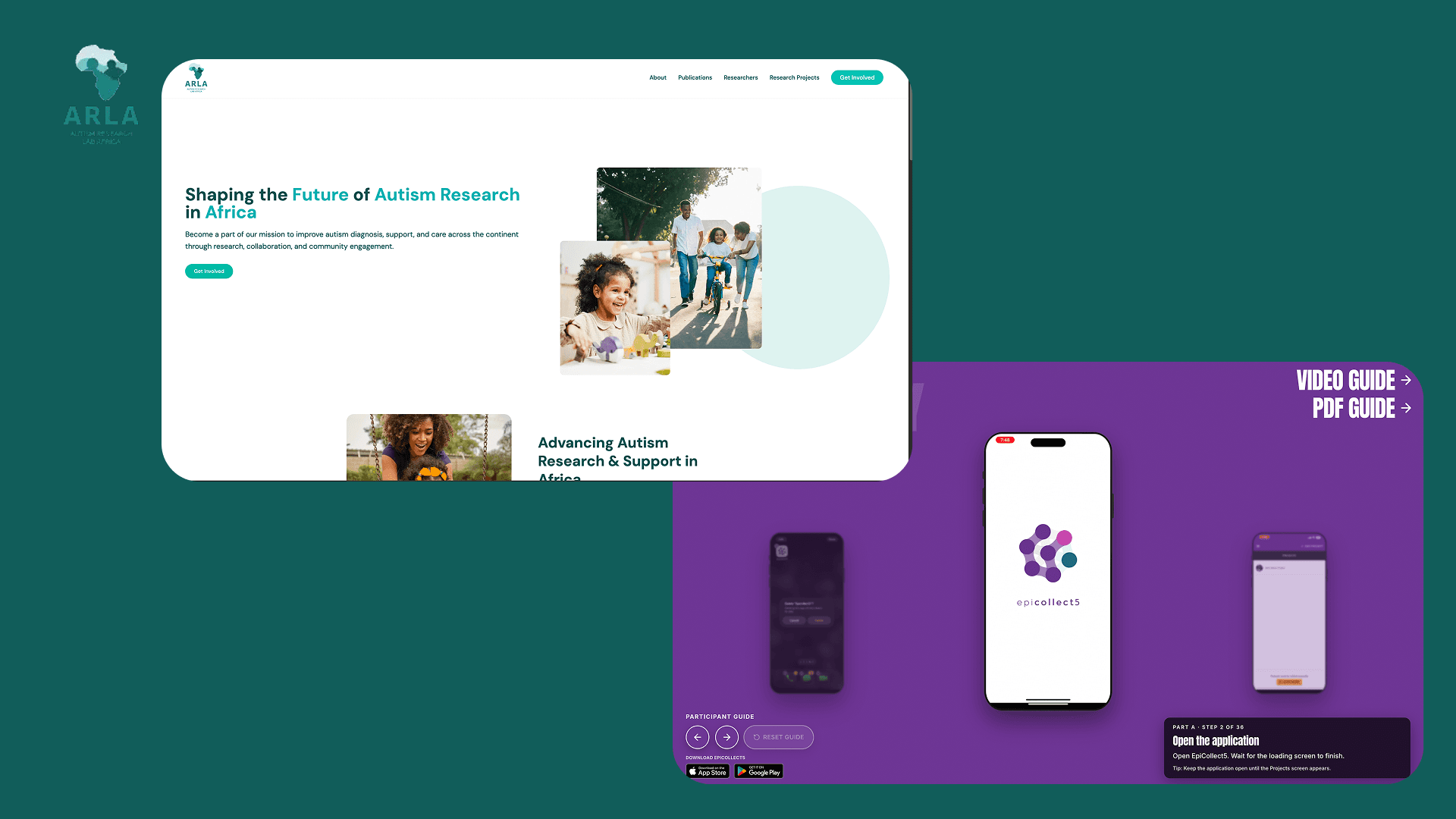
I developed the AutiNutrition Diary Study participant guide as a mobile-first web application that provides step-by-step guidance throughout the study. The experience breaks the process into manageable stages, beginning with setup and onboarding and continuing through the four-week diary period. Instead of overwhelming participants with a long instruction document, the guide presents one clear action at a time and allows participants to track their progress. The guide explains how to set up the EpiCollect5 project and participant profile, begin recording meals and snacks, capture and manage food photographs, save and upload diary entries, confirm synchronisation, continue through the four-week study, and complete the study correctly. The guide itself does not collect research responses or participant information. It acts as an instructional layer around the existing research workflow.
04
Key Features
Guided onboarding
A structured introduction helps caregivers understand what the study involves and what they need to do before starting.
Step-by-step instructions
Instructions are presented one step at a time, reducing the amount of information participants need to process at once.
Mobile-first interface
The guide is designed primarily for smartphone use, reflecting how caregivers interact with the study during everyday meal and snack logging.
Progress tracking
Participants can see where they are in the guide and resume their progress rather than having to restart from the beginning.
Four-week study guidance
The experience supports the recurring workflow of recording meals and snacks throughout the study period.
Visual instructions
Screenshots and visual placeholders are used alongside written instructions to make actions easier to understand.
Sync and completion guidance
The guide explains how to save and upload information, recognise successful synchronisation, and complete the study correctly.
Responsive and accessible design
The interface adapts to different screen sizes and uses clear navigation, readable layouts and focused interactions.
05
Technical Implementation
Architecture
Lightweight Next.js web application using a component-based architecture. The participant experience is driven by a typed configuration and a sequence of guide steps rather than disconnected pages, making content and instruction ordering easier to maintain as the study evolves.
Backend
No backend API or participant database. The guide does not recreate the EpiCollect5 research form. Participant research data remains within the study's designated data-collection workflow.
Frontend
Next.js App Router for structure and routing. TypeScript for type safety. Tailwind CSS for responsive styling. Framer Motion for transitions between guide steps. Lucide for interface icons. Next Image for optimised instructional imagery. Mobile-first interaction model for use alongside everyday meal and snack logging.
Database
No application database. Local storage is limited to guide-related state (e.g. position within instructions) so the guide remembers progress without storing research responses.
APIs / Integrations
Works alongside EpiCollect5 for actual child feeding diary data collection. The guide provides instructions for using EpiCollect5 rather than duplicating its functionality.
Infrastructure
Deployed on Vercel for simple deployment and hosting of the participant-facing web experience.
06
Challenges & Solutions
Making research instructions usable on mobile
Research instructions become difficult to follow as long documents, especially on a phone during a real-world task. Designed the experience around short, sequential steps with clear actions and supporting visuals.
Supporting a recurring four-week workflow
Caregivers repeat the same basic process over an extended period. Separated initial setup from the recurring meal and snack logging workflow so participants can return to the relevant instructions.
Avoiding unnecessary handling of participant data
Kept the guide separate from the data-collection layer. EpiCollect5 remains responsible for research data collection; the web application stores only guide progress locally.
Translating research requirements into practical UX
Balanced research protocol requirements with an experience caregivers could realistically use. Converted the study workflow into a clear participant journey prioritising task sequence, visual guidance, progress, and simple instructions.
07
Results
Produced a working participant-facing web guide for the AutiNutrition Diary Study. Caregivers get a structured digital reference for completing the study, from initial setup through four weeks of meal and snack recording to final completion. The project established a reusable approach for turning a research protocol into a focused digital participant experience without duplicating the underlying research data-collection system.
08
What I Learned
- 1.Good research software starts with the participant workflow. Understanding exactly what participants need to do, when, and where they are likely to become confused is critical, technical implementation is only part of the problem.
- 2.Keep responsibilities between systems clear. Separating the instructional experience from the research data-collection system reduced unnecessary complexity and limited participant information handled by the guide.
- 3.Mobile UX matters in real-world research. A caregiver may use the guide while managing meals, children and other responsibilities, instructions need to be concise, visual and easy to resume.
- 4.Research and software development require iteration. Caregiver engagement, app evaluation, qualitative analysis and study preparation showed the importance of connecting technical decisions back to research objectives and participant needs.
09
Links
- Live project
- auti-nutrition-diary-study.vercel.app/
- Autism Research Africa
- www.autismresearchafrica.org/researchers
LET'S WORKTOGETHER
I design and ship production-ready systems at the intersection of cloud infrastructure, full-stack engineering, and human-centred product thinking.
Send email · kuzagbechristopher@gmail.com